TenderKosh for EPC teams
Turn tender reading into faster bidding decisions.
Discover relevant tenders, monitor corrigenda, compare opportunities, and move from document reading to structured action.
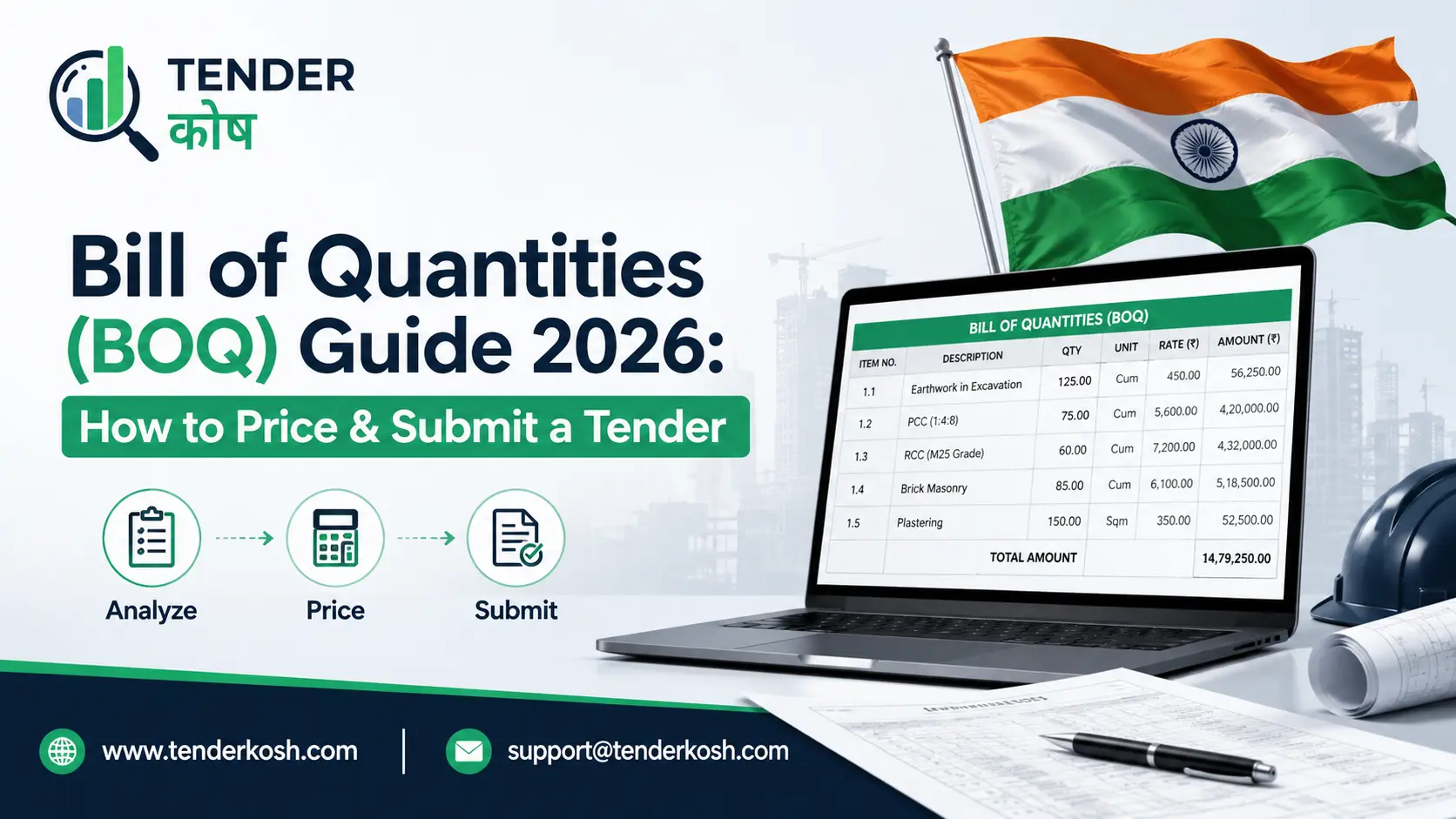
A Bill of Quantities looks intimidating the first time you open one — sometimes dozens, sometimes hundreds of line items, each needing its own rate. But the structure is more forgiving than it looks, and most BOQ bids fail for a small, repeatable set of reasons: a locked cell got edited, a unit didn’t match the spec, a line item was left blank, or the total was priced without understanding how evaluation actually works.
This guide covers what a BOQ actually is, exactly what you’re allowed to touch in the template, how pricing and evaluation really work, and a practical approach to costing each line item without under- or over-pricing your way out of contention.
| Item | Details |
|---|---|
| Used for | Multi-item procurements — construction, EPC, IT infrastructure, facility management |
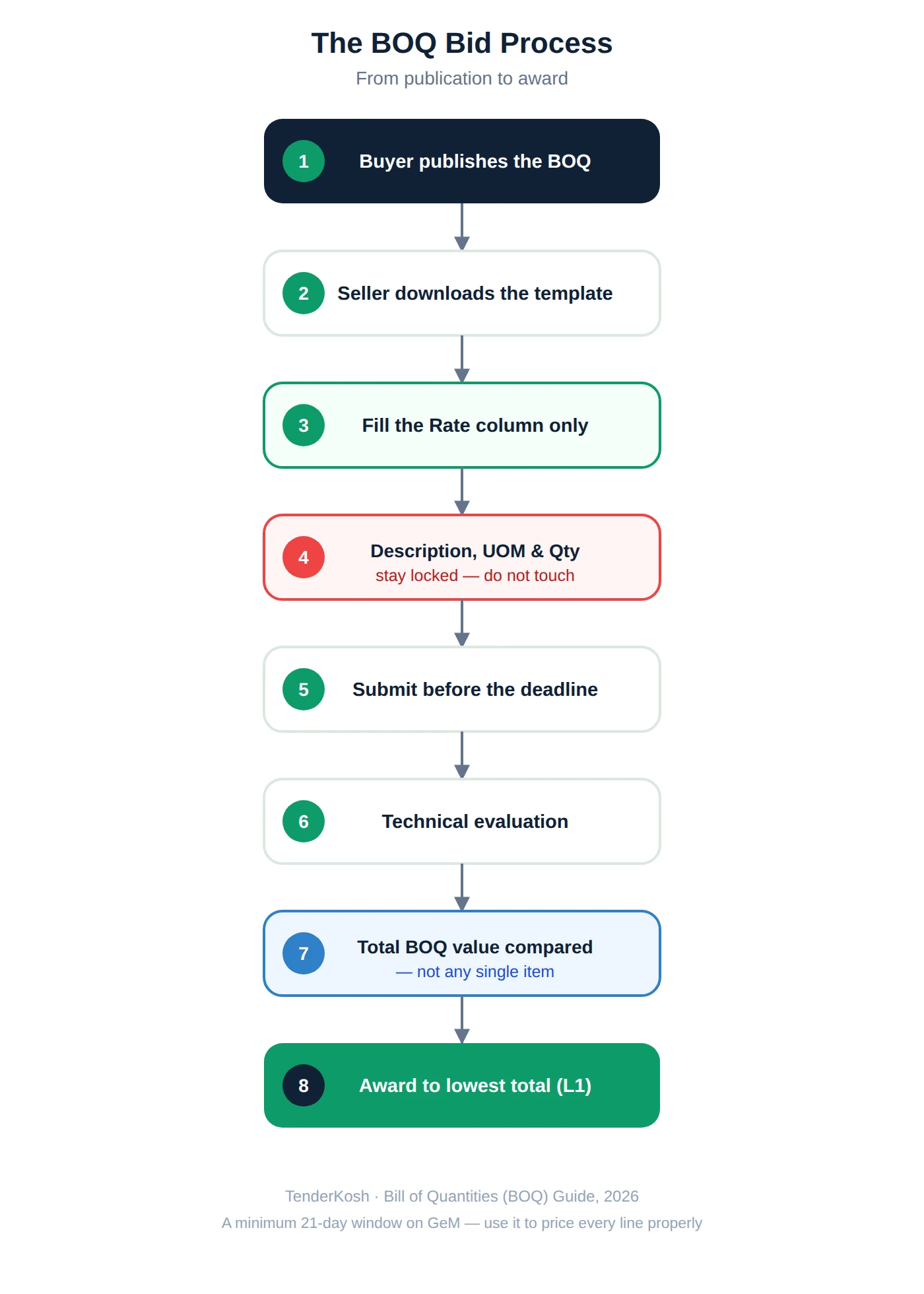
| What you can edit | Rate (unit price) column only |
| Minimum bid window (GeM) | 21 days |
| Typical line-item count | Can run into the hundreds — commonly cited up to ~500 on GeM |
| Evaluation basis | Total BOQ value (sum of qty × rate), not any single item |
| Common threshold | Often used for procurements above ₹5 lakh |
A note on rules and formats: Exact BOQ rules — GST treatment, permitted cell edits, evaluation method (total value, item-wise, or group-wise) — are set per tender and per portal. What’s described here reflects common practice on GeM and CPPP-linked government tenders as of mid-2026. Always follow the specific instructions in your bid document over any general guidance, including this one.
Key Takeaways

A Bill of Quantities (BOQ) is a structured document prepared by the buyer that lists every item of work, supply, or service required under a contract, along with its unit of measurement and quantity. The bidder’s role is to fill in the rate for each item; the total bid value is the sum of quantity multiplied by rate across every line.
Think of it as the buyer doing the scoping work upfront — breaking a complex requirement into priceable pieces — so that every bidder quotes against the exact same list. That’s what makes BOQ bids genuinely comparable across sellers, unlike a single lump-sum quote where two bidders might have silently assumed different scopes.
BOQ-based bidding shows up wherever a single contract bundles many distinct, measurable components rather than one uniform product:
Civil works, materials, labour and installation across a project — the classic BOQ use case, often following IS 1200 measurement conventions.
Hardware, licences, installation, and multi-year maintenance bundled into one procurement with distinct priced components.
Housekeeping, security, or manpower contracts with varied roles, shifts, or locations each needing separate rates.
| Aspect | Standard / Regular Bid | BOQ Bid |
|---|---|---|
| What you price | A single product or service line | Multiple line items, potentially hundreds |
| What you can edit | Price field for your listed product | Rate column only — description/quantity locked |
| Typical minimum window | Short (varies by bid) | Minimum 21 days on GeM |
| Evaluation | Price against fixed specs | Total BOQ value across all items |
Formats vary slightly by buyer and category, but a standard Indian tender BOQ consistently includes the same core columns:
| Column | Meaning | Who Fills It |
|---|---|---|
| Sl. No. / Item No. | Line item identifier | Buyer |
| Description | What the item is — specification, scope, or work description | Buyer |
| UOM (Unit of Measurement) | The unit the quantity and rate are expressed in (e.g. sqm, nos, kg, man-month) | Buyer |
| Quantity | How much of that item is required | Buyer |
| Rate | Your quoted unit price for that item You fill this | Seller |
| Amount | Quantity × Rate, usually auto-calculated by a locked formula | System / formula |
Larger or more complex BOQs often add a section structure — grouping related line items (e.g. “Civil Works,” “Electrical,” “Testing & Commissioning”) with section subtotals, followed by a grand total. This makes a long BOQ reviewable in parts rather than one unreadable list.
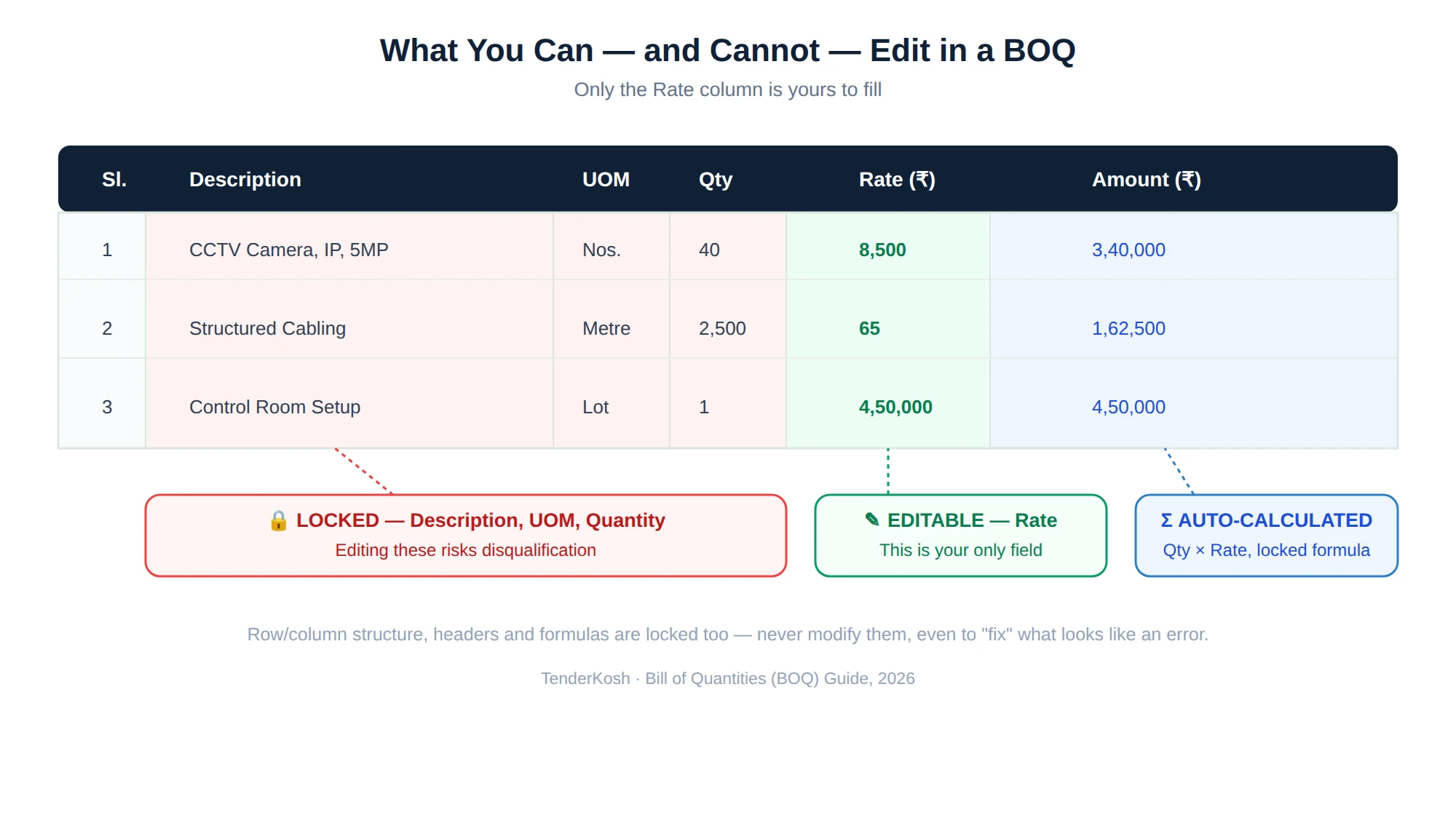
This is the single most consequential rule in BOQ bidding, and it trips up more bidders than any pricing mistake.
| Field | Status | Consequence of Changing It |
|---|---|---|
| Rate / unit price | Editable | This is the only field you’re expected to fill |
| Item description | Locked | Portal rejection or disqualification |
| Unit of measurement | Locked | Portal rejection or disqualification |
| Quantity | Locked | Portal rejection or disqualification |
| Row/column structure & formulas | Locked | Bid treated as non-compliant |
The BOQ template must remain structurally unmodified. You may only fill in the designated (usually unlocked or highlighted) rate cells. Any change to headers, row or column structure, or protected formulas — even accidental, even to “fix” what looks like an error — risks disqualification. If you genuinely believe a quantity or description is wrong, raise a pre-bid query through the proper channel; don’t edit the file yourself.
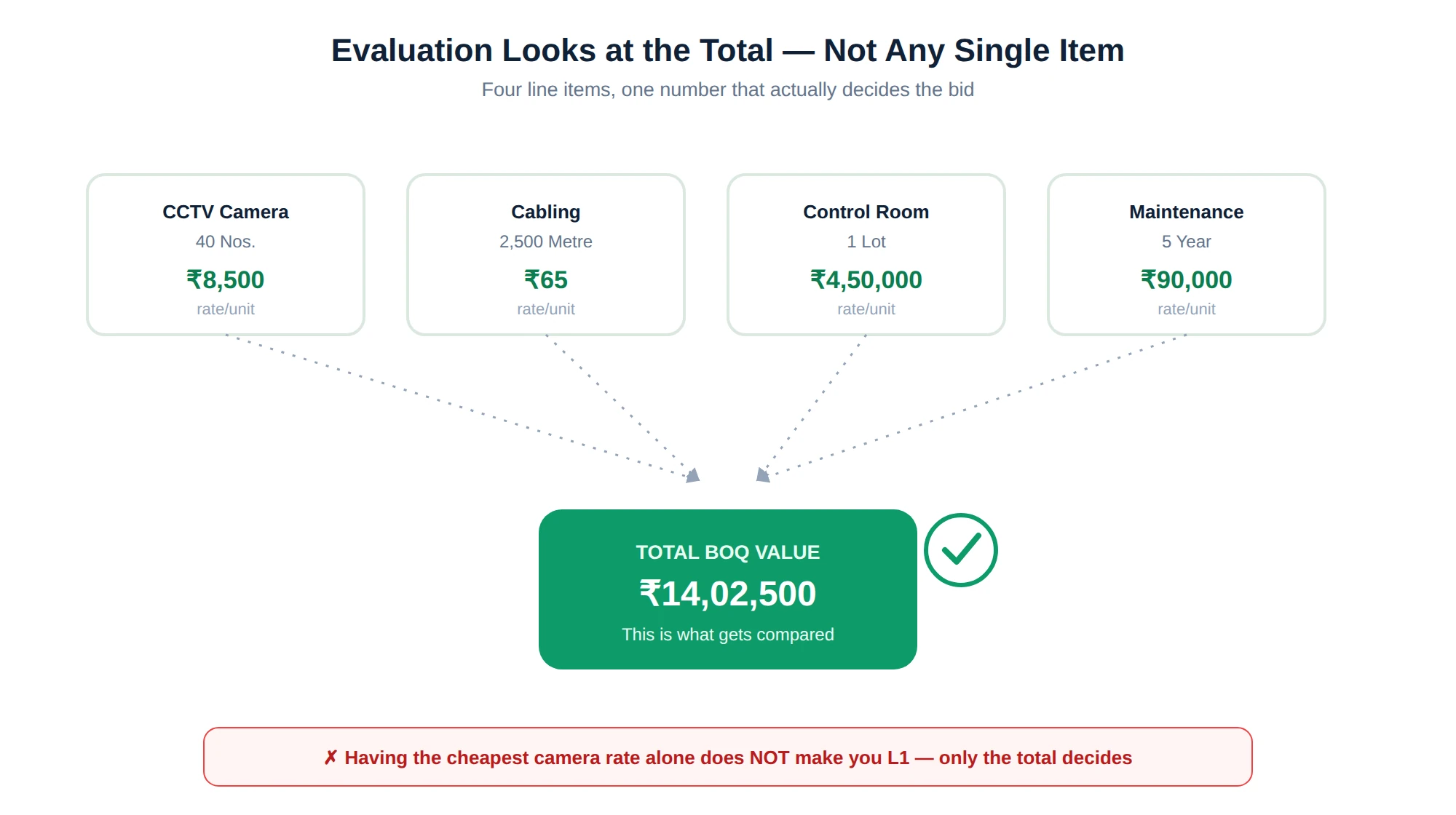
A BOQ bid isn’t won by having the single lowest price anywhere on the sheet — it’s won on the total.
The bidder with the lowest total BOQ value — the sum of quantity × rate across every line item — is generally L1, even if a competitor priced one specific item lower than you did. Pricing a single item unrealistically low doesn’t decide the outcome on its own; the buyer is comparing grand totals, not cherry-picking individual rates.
Some tenders use variations on this — item-wise or group-wise evaluation instead of a single grand total — particularly on larger EPC or turnkey procurements. Always check the evaluation methodology stated in the bid document; it changes how aggressively you should price any one line versus the whole.
No. Evaluation is almost always based on the total BOQ value across all line items, not any single price. An unrealistically low rate on one item doesn’t offset higher rates elsewhere in the buyer’s comparison — and it can actually hurt you if it looks like a pricing error during technical scrutiny.
Illustrative, based on a typical structure — not a real, currently-live tender: A government buyer floats a BOQ for a security system installation: 40 CCTV cameras (nos.), 2,500 metres of cabling (metre), 1 control room setup (lot), and 5 years of comprehensive maintenance (year). Bidder A quotes an aggressively low camera rate but average rates elsewhere; Bidder B quotes moderate rates across the board. If Bidder B’s total comes out lower once every line is summed, Bidder B is L1 — regardless of who had the cheapest camera. This is exactly why chasing the lowest price on your most visible line item, while ignoring the total, is a losing strategy.
| Item | UOM | Qty | Rate (₹) | Amount (₹) |
|---|---|---|---|---|
| CCTV Camera, IP, 5MP | Nos. | 40 | 8,500 | 3,40,000 |
| Structured Cabling | Metre | 2,500 | 65 | 1,62,500 |
| Control Room Setup | Lot | 1 | 4,50,000 | 4,50,000 |
| Comprehensive Maintenance | Year | 5 | 90,000 | 4,50,000 |
Total BOQ value in this illustrative example: 3,40,000 + 1,62,500 + 4,50,000 + 4,50,000 = ₹14,02,500 — this total, not any single row, is what gets compared against other bidders.
Rushing straight to a number per line is how bids end up underpriced on execution-heavy items and overpriced on simple ones. A more disciplined approach breaks each rate into its real components:
Price your highest-quantity items with the most care. A ₹5 error on a rate multiplied across 2,500 units moves your total by ₹12,500 — the same ₹5 error on a “quantity: 1” line item barely matters. Spend your review time proportional to quantity, not alphabetically down the list.
Whether your rate should be GST-inclusive or exclusive is not standard across every tender — it’s set by the specific bid’s financial instructions.
| Format | What It Means | What to Check |
|---|---|---|
| GST-inclusive rate | Your quoted rate already includes applicable GST | Confirm the applicable GST rate/HSN code matches the item category |
| GST-exclusive rate + separate GST line | Base rate quoted; GST computed and shown separately | Confirm whether GST is auto-calculated or must be entered |
| Lump sum inclusive of GST | A single all-in figure for the whole contract or a major work package | Common on turnkey/EPC-style BOQs with fewer, larger line items |
Getting the GST treatment wrong doesn’t just risk a pricing error — it can make your bid non-comparable to competitors who followed the instructions correctly, which is itself grounds for the buyer to treat your bid as non-responsive. Read the financial bid instructions before you price a single line, not after.
You can adjust quantities if you think they’re wrong.
Quantities are locked by the buyer. If you believe a quantity is incorrect, raise it as a pre-bid query — don’t edit the template.
The cheapest single item usually wins the contract.
Evaluation is almost always based on the total BOQ value across every line, not any individual rate.
A BOQ is just a longer version of a normal quotation.
A BOQ’s locked structure exists specifically so every bidder prices against the identical scope — that’s what makes bids genuinely comparable, unlike free-form quotes.
Excel formulas in the BOQ are just a convenience you can override.
Protected formulas (like auto-calculated amounts) are part of the locked structure. Overriding them risks the bid being treated as non-compliant.
Keep a running record of your costed rates by item category. Reusable, updated rate data turns a 500-line BOQ from a week of work into a day of review.
Independently recompute the grand total outside the locked template. If it doesn’t match what the formula shows, find the discrepancy before you submit, not after.
If an item description is unclear, use the pre-bid query window. Guessing at scope and pricing it wrong is worse than asking.
For BOQs with 100+ line items, price in two passes: a fast first pass using your rate library for every line, then a focused second pass revisiting only the highest-quantity and highest-value items with real scrutiny. This gets you 90% accuracy in 30% of the time, then spends the remaining time where it actually moves the total.
Complex BOQ tenders take real time to price properly. TenderKosh tracks GeM, CPPP, SECI, NTPC and 1,000+ government procurement portals — including corrigenda — so you spot BOQ opportunities early and have the full 21-day window to price them right, not the last three days.
Browse Live Tenders View Plans Why TenderKoshA Bill of Quantities rewards the same discipline as any other government tender — read the instructions before you touch the file, respect what’s locked, and price every line as if it were the one that decides the total, because collectively, it is. The sellers who do well on BOQ bids aren’t necessarily the ones with the lowest individual rates; they’re the ones whose total holds up to scrutiny, whose units match the spec, and who never left a cell blank under deadline pressure.
A 300-line BOQ with a 21-day window sounds like plenty of time — until it isn’t. TenderKosh’s tender intelligence flags BOQ-based bids as soon as they’re published across GeM, CPPP and 1,000+ other portals, so your pricing team gets the full window instead of whatever’s left after you found the tender.
A Bill of Quantities (BOQ) is a structured document prepared by the buyer that lists every item of work, supply, or service required under a contract, along with its unit of measurement and quantity. The bidder’s job is to fill in the rate for each item; the total bid value is the sum of quantity multiplied by rate across every line.
No. In a BOQ bid, sellers can only fill in the rate (unit price) column. Editing the item description, unit of measurement, quantity, or the template’s structure and formulas is not permitted, and doing so typically causes portal rejection or disqualification.
By total value. The bidder with the lowest total BOQ value (sum of all quantity times rate line items) is generally L1, even if a competitor priced one specific item lower. Pricing a single item unrealistically low does not decide the outcome on its own — the overall total does.
BOQ bids on GeM are typically open for a minimum of 21 days, giving sellers time to price potentially dozens or hundreds of line items accurately before submission.
GeM BOQ-based bids can include a large number of line items — commonly cited up to around 500 — making them suited to complex, multi-component procurements like EPC works, IT infrastructure projects, or facility management contracts.
Yes, it matters significantly. Units should match the standard specified in the tender (for example, square metres per IS 1200 conventions in construction works, not square feet). Quoting in the wrong unit can distort your rate by orders of magnitude and lead to disqualification or a severely mispriced bid.
This depends on the specific tender’s instructions — some require GST-inclusive rates per line item, others evaluate base rates with GST added separately or as a lump sum. Always check the BOQ instructions and financial bid format before assuming either way, since getting this wrong can make your bid non-comparable or non-compliant.
An unpriced or blank line item is one of the most common reasons BOQ bids are rejected or treated as non-responsive, since the buyer cannot compute a valid total. Every rate cell that requires an entry must be filled, even if the quantity for that line is small.
Discover relevant tenders, monitor corrigenda, compare opportunities, and move from document reading to structured action.