TenderKosh for EPC teams
Turn tender reading into faster bidding decisions.
Discover relevant tenders, monitor corrigenda, compare opportunities, and move from document reading to structured action.
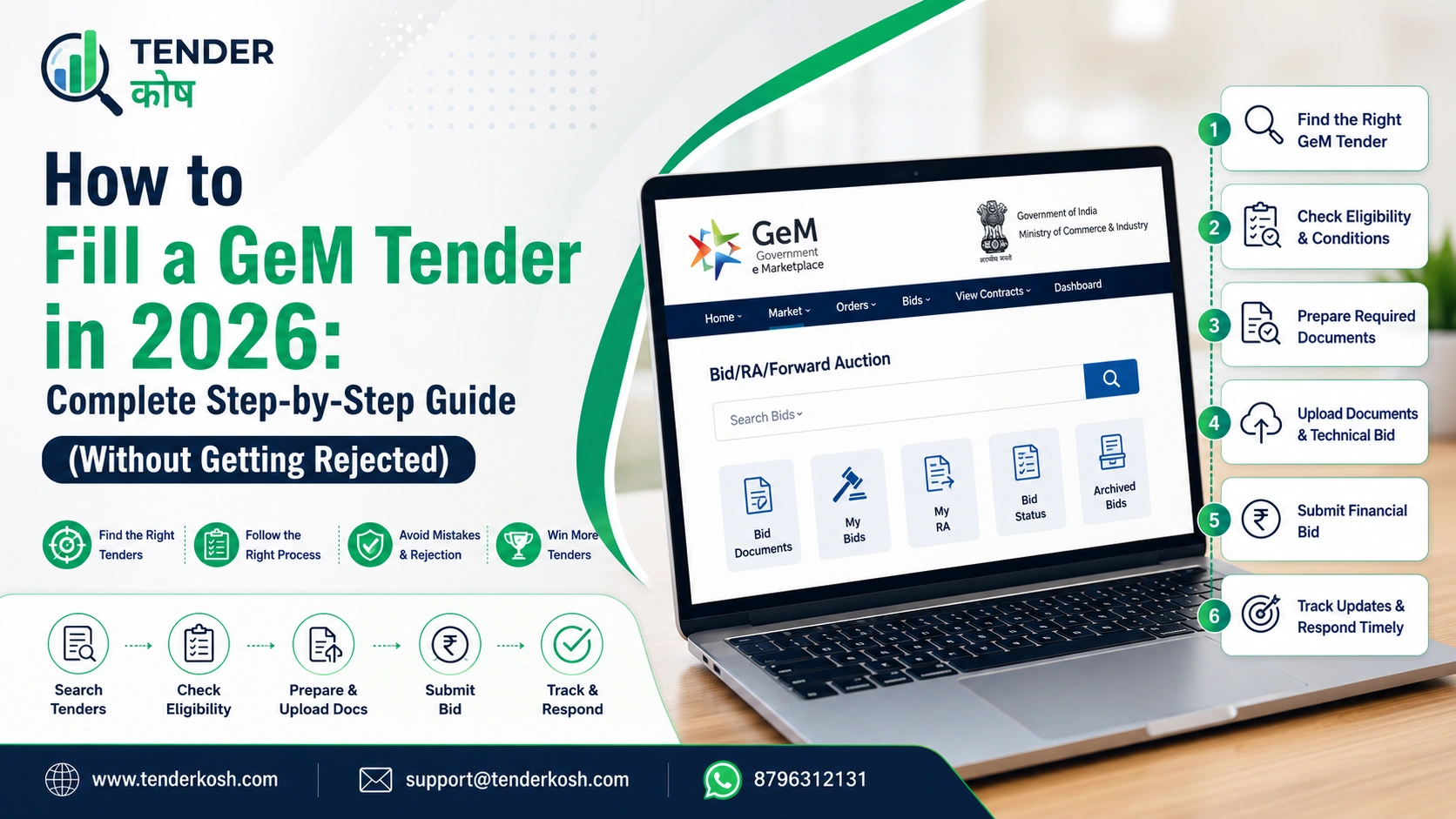
Thousands of sellers register on the Government e-Marketplace (GeM) every month, yet only a small fraction ever win an order. The reason is rarely the product or the price — it is that the bid was filled incorrectly: a wrong figure in the compliance grid, a missing document, a corrigendum nobody acknowledged, or a price that was not all-inclusive.
This complete guide walks through the entire GeM bid-filling process the way an experienced bid manager would — what to check, what to upload, how to price, and the specific mistakes that quietly disqualify otherwise strong bids.
| Item | Details |
|---|---|
| Platform | GeM (Government e-Marketplace) |
| Difficulty | Intermediate |
| Time Required | 2–3 hours (first-time), 30–45 min once you have a document library |
| Documents Needed | GST, PAN, Udyam, OEM authorisation (if reselling) |
| EMD | Buyer-specific — nil unless enabled in the bid |
| Performance Security | 2–10% of contract value (buyer sets exact %) |
| Minimum BOQ Bid Window | 21 days |
A note on rules and figures: The thresholds, percentages, and rules below (GFR Rule 149, EMD exemptions, performance security ranges) reflect GeM’s General Terms and Conditions and public procurement policy as of mid-2026. Individual bids can set their own EMD, security percentage, and buyer-added ATC clauses within these rules. Always verify the exact figures on the specific bid page and the official GeM portal before submitting.
Key Takeaways
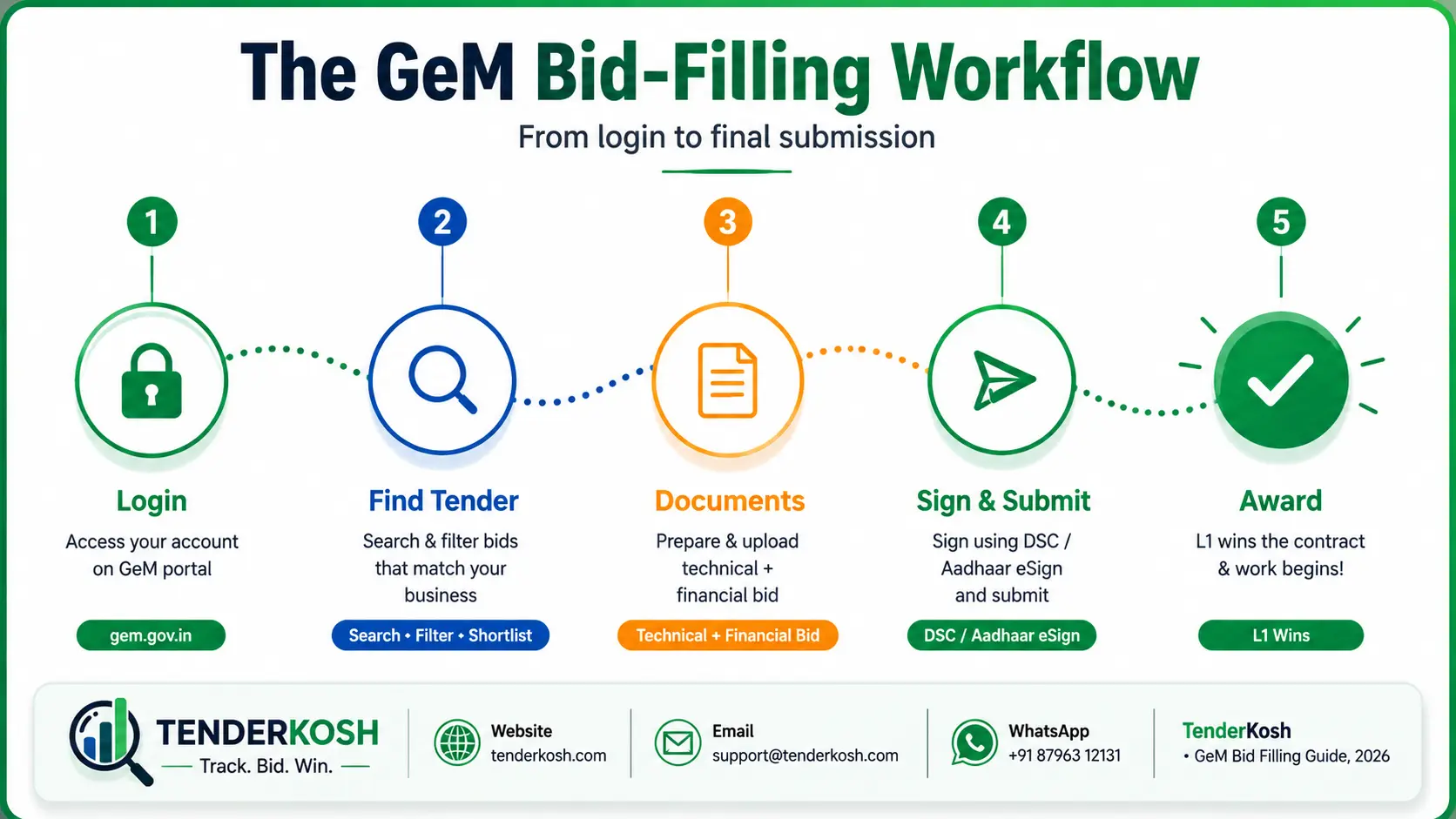
Table of contents
Verified scale, so you know exactly how big the opportunity — and the competition — really is:
Source: GeM’s official 8th-anniversary release (via DD News, Jan 2026) and GeM CEO Mihir Kumar’s official FY26 statement (via Zeebiz, April 2026). Figures change as GeM publishes new data — check gem.gov.in/statistics for the latest.
Yes. GeM’s services segment has grown especially fast — industry analysis of GeM’s own annual data shows services now account for a majority of GMV, with near-100% year-on-year growth in service procurement through FY 2024-25, alongside continuous expansion in product and service categories.
GeM isn’t static — understanding its trajectory helps explain today’s rules:
GeM launches in August as India’s National Public Procurement Portal, piloted for central departments and CPSUs in Delhi/NCR.
General Financial Rules revised to make GeM procurement mandatory for common-use goods and services above prescribed thresholds — the rule now known as GFR Rule 149.
Udyam Registration replaces the old MSME/UAM system; GeM integrates Udyam data to power MSE EMD exemptions and purchase preference.
Services overtake goods in GMV share; dozens of new service categories added; reverse auction and bid-evaluation workflows streamlined.
Continued tightening of documentation and BIS-certification enforcement, Aadhaar-linked mobile verification, and expansion into new categories such as EV products and charging infrastructure.
“Filling a GeM tender” is the act of responding to a buyer’s bid or reverse auction on the Government e-Marketplace by completing the technical compliance details, uploading the required documents, and submitting a price against the buyer’s specifications before the deadline.
On GeM, the word “tender” is used loosely. What you are really responding to is a Bid or a Bid to RA (reverse auction) floated by a government buyer. Every bid ties back to a product or service you have already listed in your GeM catalogue — you cannot quote for something you have not listed.
Three layers of terms govern every bid, and their order of priority is something most first-time sellers miss:
| Layer | What It Is | Priority |
|---|---|---|
| GTC — General Terms & Conditions | Standard rules applying to all GeM bids | Lowest |
| STC — Special Terms & Conditions | Category-specific terms for certain products/services | Overrides GTC |
| ATC — Additional Terms & Conditions Read first | Extra clauses the buyer adds to this specific bid | Highest — overrides STC and GTC |
Read the ATC first. A buyer-added ATC clause can quietly change eligibility, documentation, delivery or pricing rules for that one bid — and it beats everything else in the GTC and STC.
Download all bid documents immediately after publishing. Buyers often issue corrigenda within the first few days — if you wait a week to open the bid, you may already be working from an outdated ATC.
How you fill a bid depends on its type. There are four routes you will encounter:
| Bid Type | When It’s Used | How You Fill It | Typical Minimum Window |
|---|---|---|---|
| Standard / Regular Bid | Product or service fitting an existing GeM category | Quote a single sealed price against fixed specs; L1 wins | Short (check bid page) |
| Bid to RA (Reverse Auction) | Buyer wants live price competition after technical screening | Submit a sealed price, then compete live by lowering it | Short + live RA event |
| BOQ Bid (Bill of Quantities) | Multiple items/services (often 5+), e.g. IT, facilities, construction | Quote a rate for every line item; total decides L1 | Minimum 21 days |
| Custom Bid | Specialised product/service outside the standard catalogue, value above ₹5 lakh | List under Universal Category first, then quote | Varies |
For a deeper breakdown of the auction mechanics, see our guide on GeM Reverse Auction Strategy (link once published).
Any business registered as a seller on GeM with an approved catalogue listing can respond to a bid, provided it meets the bid’s eligibility filters.
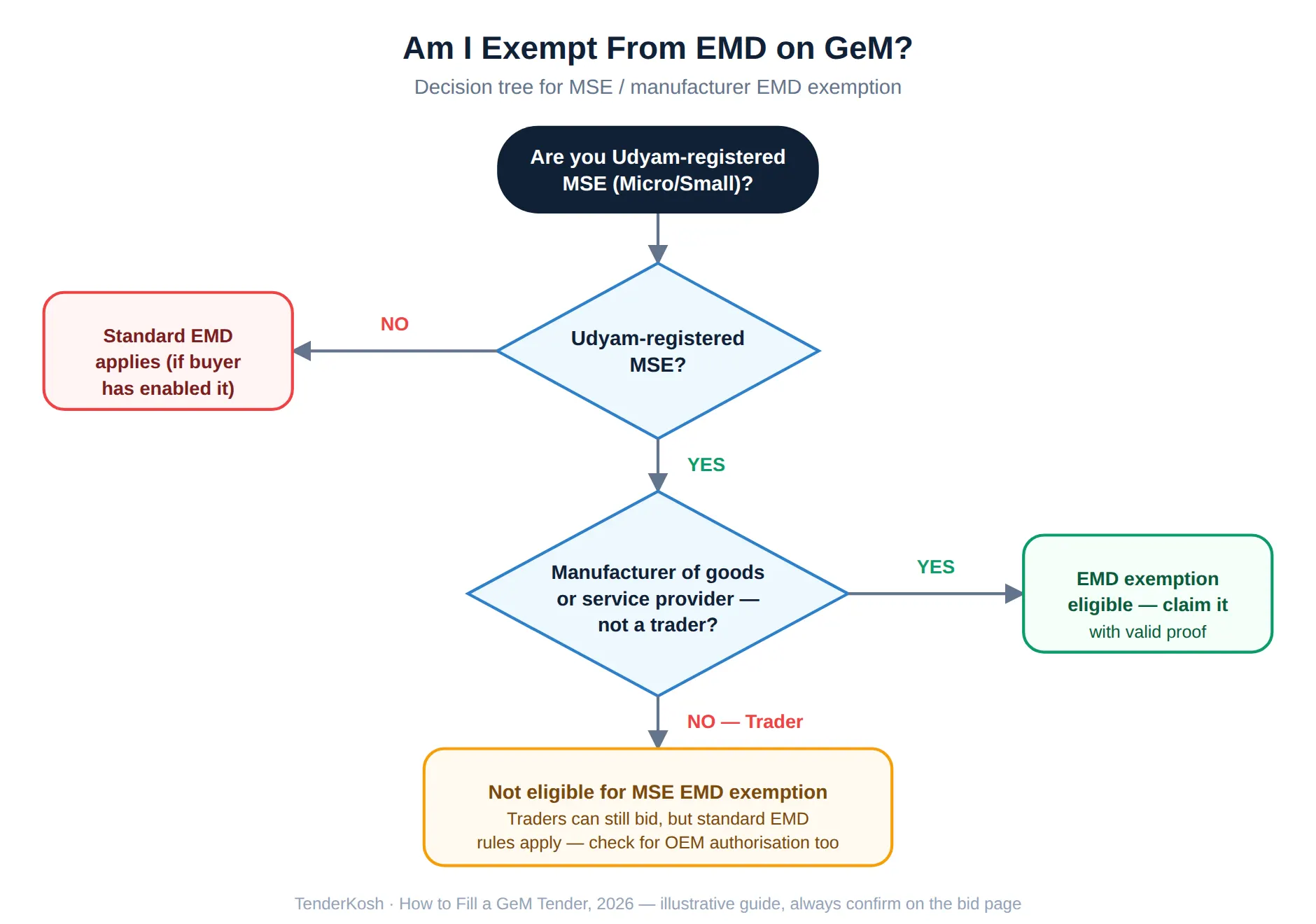
Manufacturers of goods qualify for MSE EMD and experience exemptions if Udyam-registered as Micro/Small.
Providers of services on GeM’s service bids also qualify for MSE exemptions where applicable.
Can bid with valid OEM authorisation but do not receive MSE EMD/experience exemptions — only manufacturers/service providers do.
Only manufacturers of goods and providers of services qualify for MSE exemptions. Traders can bid, but do not get the MSE EMD and experience waivers. If you sell someone else’s branded product, you will usually need OEM authorisation to quote it. New to seller onboarding? Start with our GeM seller registration guide (link once published).
Before you spend an hour filling a bid, confirm you clear its eligibility filters. Buyers commonly set:
If a non-MSE is L1 and an MSE bidder has quoted within a defined margin (commonly L1 + 15%), the MSE may be given the chance to match the L1 price and be awarded a share of the contract. This is why MSE status is worth claiming correctly. See our MSME benefits in government tenders guide for the full rules.
Illustrative, not an actual documented case: An electrical equipment supplier bids on a ₹2 crore GeM tender for transformers. Their technical bid is rejected because they entered “as per datasheet” instead of the exact voltage rating the compliance grid asked for — even though their product genuinely met the specification. The lesson: the system checks what you typed, not what your product can actually do. Always translate your datasheet into the exact number the field is asking for.
Assemble these before you open the bid, so you are reviewing, not scrambling:
| Document | Purpose | Who Needs It |
|---|---|---|
| GST registration | Tax identity & invoicing | All sellers |
| PAN | Business/entity identity | All sellers |
| GeM seller account (active, KYC complete) | Portal access & bidding | All sellers |
| Udyam registration MSME | Unlocks MSE EMD & experience exemptions | MSMEs |
| DPIIT startup certificate | Startup exemptions | Recognised startups |
| OEM authorisation / Brand Approval | To quote branded products as reseller | Resellers/distributors |
| Product certifications (BIS/ISO/CE, etc.) | Technical compliance — only those the bid demands | As per bid |
| Past performance / completion certificates | Meet experience criteria | Where experience is required |
| ATC annexures / declarations | Buyer-specific formats (MII, undertakings) | As per ATC |
Related reading: our tender compliance checklist.
Three money-related items appear in most bids. Understanding each keeps you from either overpaying or getting disqualified.
EMD is a refundable deposit that shows you are a serious bidder. On GeM it is charged only when the buyer includes it in the bid.
Udyam-registered Micro and Small Enterprises are exempt from EMD under the Public Procurement Policy and GFR rules — but only manufacturers of goods and providers of services qualify; traders are excluded. To claim it, select the EMD-exemption option in your bid response and upload valid supporting proof — don’t just leave the field blank. For the full mechanics and refund process, read our EMD vs bid security vs performance guarantee guide.
A small, usually non-refundable processing charge that some bids carry. Many GeM bids do not levy one, but check the bid page so it does not surprise you.
Performance security is a guarantee the winning seller provides to ensure the contract is delivered. Per GeM’s General Terms and Conditions, the default is 2% of the contract value, and the buyer may set it anywhere between 2% and 10%, indicating the exact percentage in the bid.
| Item | Charged When | Typical Value | Refundable? | MSE Exemption? |
|---|---|---|---|---|
| EMD | Buyer enables it in the bid | Often ~1–2% of tender value* | Yes | Yes (manufacturers/service providers) |
| Tender fee | Some bids only | Small fixed amount | Usually no | Varies |
| Performance security | On award, to winner | 2% default (buyer may set 2–10%) | Released after successful delivery | Reduced/relaxed in some cases |
*Illustrative range only — the actual EMD, if any, is stated in each bid. Always use the figure on the bid page, not an assumed one.
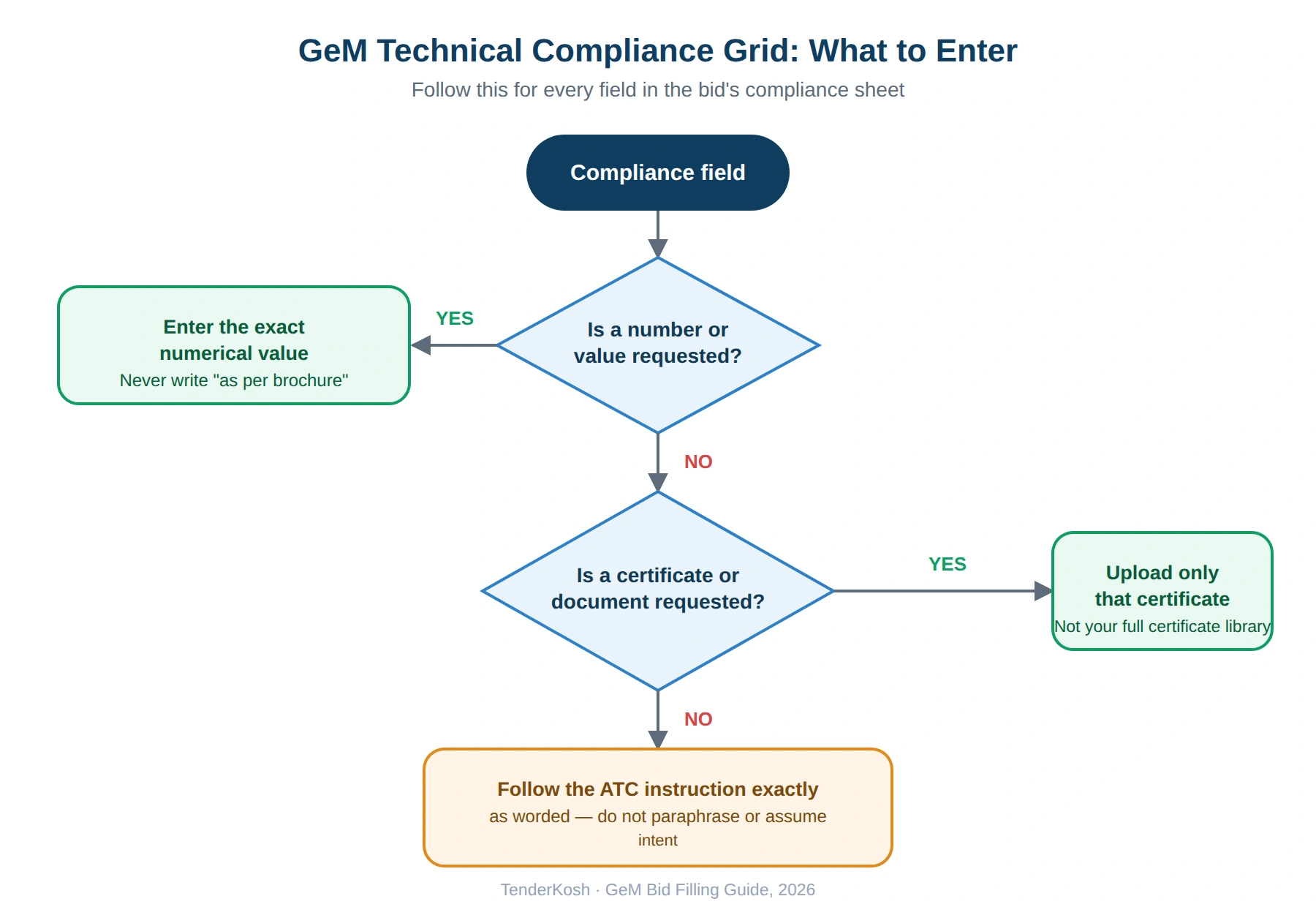
This is where most avoidable rejections happen. GeM asks you to confirm your offer against each specification, usually as a numerical value or a Yes/No in a compliance grid.
Quote exact numbers, never “as per brochure” or “as per datasheet.” If the bid asks for a display size, a power rating, a response time or an SLA figure, enter the actual figure the portal asks for. Vague answers are read as non-compliance.
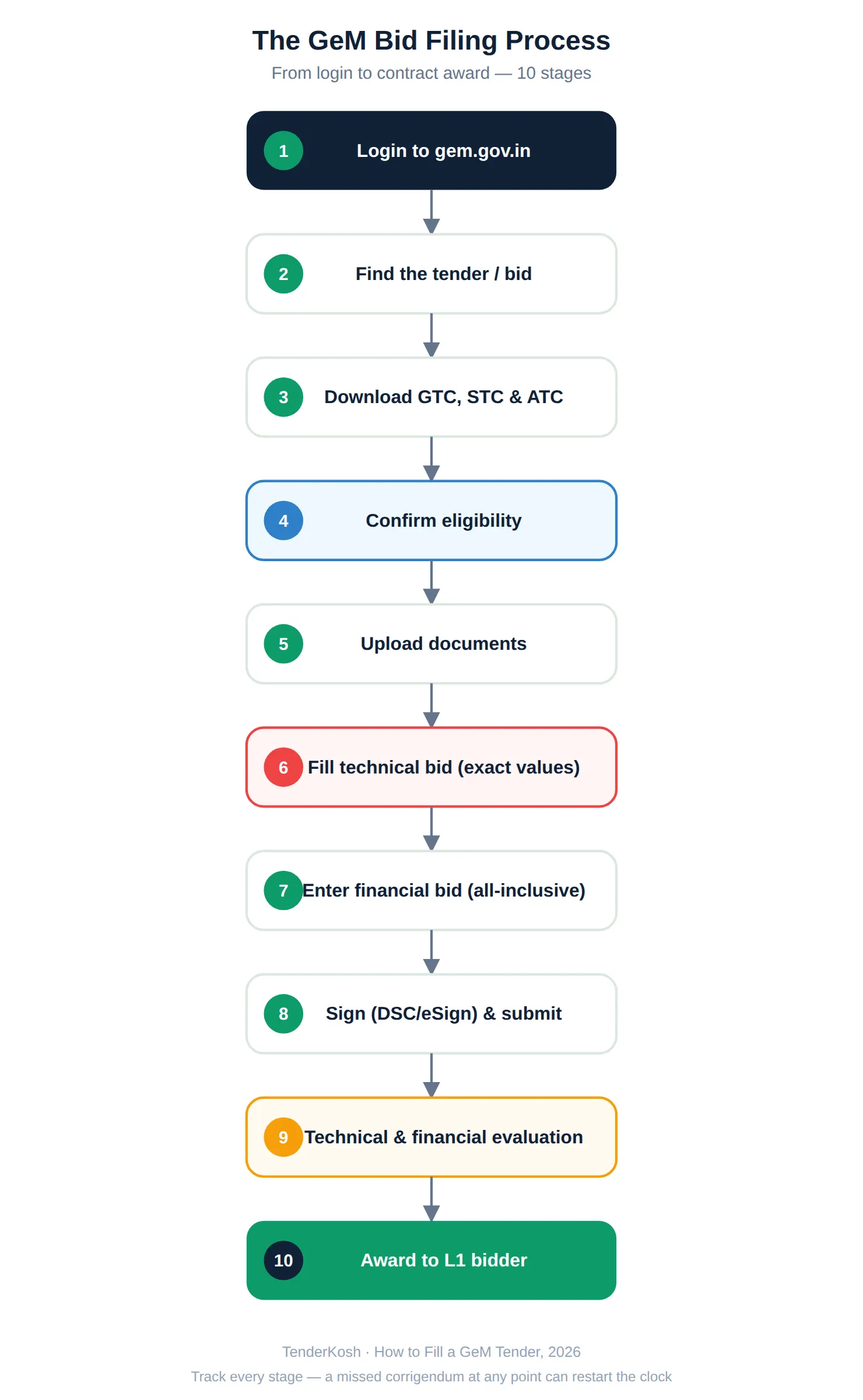
Here is the full sequence, in order. Follow it and you will not miss a step.
GeM bids are typically evaluated in two stages:
No. The lowest price only wins among bids that first clear technical evaluation. A technically non-compliant L1 bid can be rejected entirely, and the next qualifying bidder becomes the new L1.
Buyers cannot split a demand just to stay under approval thresholds — GeM treats demand-splitting as a violation of GFR Rule 149 and can block or cancel such bids. As a seller, this protects you from artificially fragmented, low-value awards.
Rather than fixed dates (which change per bid), here is the pattern every bid follows so you can plan around any deadline:
| Stage | What Happens | Your Action |
|---|---|---|
| Publication | Buyer floats the bid/RA | Set an alert; read the ATC |
| Query window | Seller clarifications (if enabled) | Ask early; watch for a corrigendum in reply |
| Bid preparation | Open window (short for products; ≥21 days for BOQ) | Fill technical + price; upload docs |
| Bid end date & time (IST) | Hard cut-off | Submit early — the portal locks at close |
| Technical opening & evaluation | Buyer screens qualification | Respond promptly to any query |
| Financial opening / RA | Prices compared or auction held | Have your floor price ready for RA |
| Award & delivery | L1 gets the contract | Furnish performance security; deliver on time |
Because a corrigendum can move the deadline or change requirements, tracking amendments is essential — see our guide on finding corrigenda on GeM, CPPP & state eProcurement portals.
The lowest price always wins.
A technically non-compliant L1 bid can be rejected entirely — the lowest price only wins among bids that pass technical evaluation first.
Every GeM bid requires EMD.
EMD applies only when the buyer enables it for that specific bid — and Udyam-registered MSE manufacturers/service providers can be exempt even then.
Traders get the same benefits as manufacturers.
MSE EMD and experience exemptions apply only to manufacturers of goods and providers of services — traders are excluded, even if Udyam-registered.
You can edit a bid any time before award.
You can only modify or withdraw a bid before the bid end date and time. Once the deadline passes, it is permanently locked.
Vendors who focus on a few closely related categories tend to win more than those spreading thin. Depth beats breadth.
Profile audit, document templates, and a pricing checklist turn a two-hour bid into a thirty-minute one.
Decide your RA walk-away point before the auction opens; small decrements can secure L1 without gutting margin.
One mispriced line can distort your whole total — verify every rate before submitting.
Confirm it works the day before, not the hour of — signature failures at deadline cost real contracts.
On any bid you have entered, check for amendments right up to the closing date and time.
Keep a running “rejection log” of every bid you’ve lost and why. Most sellers repeat the same 2–3 mistakes across multiple bids without realising it — a five-minute review after each rejection saves hours on the next ten bids.
| Aspect | Old Manual Tendering | GeM in 2026 |
|---|---|---|
| Discovery | Newspaper notices, department visits | Searchable online bids, filters, alerts |
| Access | Favoured insiders & large firms | Open to MSMEs, startups & new sellers |
| Submission | Physical documents, tender boxes | Online upload, DSC/eSign, timestamped |
| Price discovery | Opaque | Transparent L1 & live reverse auctions |
| MSE benefits | Hard to claim | EMD & experience exemptions built in |
With thousands of GeM bids floated every month and BOQ windows as short as 21 days, missing an alert or an amendment can cost you a contract. TenderKosh tracks GeM, CPPP, SECI, NTPC and 1,000+ government procurement portals — plus corrigenda — so you find the right bids early and submit fully prepared.
Browse Live Tenders View Plans Why TenderKoshFilling a GeM tender well is a discipline, not a gamble. The sellers who win consistently are not the ones with the flashiest catalogue — they are the ones who read the ATC first, confirm eligibility honestly, upload exactly what is asked, quote an all-inclusive price, and submit early with a valid signature. Do that repeatedly and you build both a track record and the muscle memory that makes every future bid faster and stronger.
Keep this guide handy, work through the checklist on your next bid, and treat every corrigendum as if it could change everything — because sometimes it does.
The hardest part of GeM isn’t filling one bid — it’s finding the right bids and never missing a corrigendum across dozens of them. TenderKosh’s AI-driven tender intelligence surfaces GeM (and CPPP, SECI, NTPC, Railways, State & 1,000+ portals) opportunities that match your profile, flags eligibility and key dates, and tracks amendments so a last-minute change never costs you a contract.
It means responding to a buyer’s bid or reverse auction on GeM by completing the technical compliance details, uploading the required documents, and submitting an all-inclusive price before the deadline.
No. EMD applies only when the buyer includes it. Udyam-registered Micro and Small Enterprises that are manufacturers or service providers are exempt under the Public Procurement Policy and GFR rules; traders are not.
Yes, traders can participate, but they are generally not eligible for certain MSE exemptions. Some bids also require OEM authorisation for branded products.
Simple product bids can be short, while BOQ bids are usually open for a minimum of 21 days. Always confirm the exact bid end date and time on the bid page.
In a Standard Bid you submit a sealed price and the lowest qualifying price (L1) wins. In a Reverse Auction, qualified sellers compete live by lowering their prices, and the lowest at close becomes L1.
ATC is the buyer’s Additional Terms & Conditions for a specific bid. It overrides both STC and GTC, so its clauses can decide your eligibility. Read it first.
The default is 2% of the contract value; the buyer may set it between 2% and 10% and states the applicable figure in the bid.
Yes, any time before the bid end date and time. After the deadline the bid is locked, so submit early.
Typically GST, PAN, an active GeM seller account, Udyam (for MSME benefits), OEM authorisation where applicable, required product certifications, and any ATC annexures.
Incomplete or wrong documentation, “as per brochure” answers, a missed corrigendum, wrong file formats, and prices that are not all-inclusive at the consignee location.
GeM allows signing via a Class 3 DSC or Aadhaar eSign, depending on the bid. Keep one enabled before the deadline.
A Bill of Quantities bid for multiple items or services. You quote a rate for each line, and the lowest overall total is L1.
No. The lowest price only wins among bids that first clear technical evaluation. A technically non-compliant L1 bid can be rejected entirely, and the next qualifying bidder becomes the new L1.
Discover relevant tenders, monitor corrigenda, compare opportunities, and move from document reading to structured action.