TenderKosh for EPC teams
Turn tender reading into faster bidding decisions.
Discover relevant tenders, monitor corrigenda, compare opportunities, and move from document reading to structured action.
You found the right tender, prepared a strong bid, and submitted before the deadline. Then you learn your bid was rejected — because the authority extended the deadline, changed an eligibility clause, or revised the EMD in a tender corrigendum you never saw. It happens constantly. A corrigendum carries the same legal force as the original tender, so bidding against an outdated document is one of the quietest, most avoidable ways to lose work you should have won.
This practical guide shows you exactly how to find a tender corrigendum on the three places that matter most: the Government e-Marketplace (GeM), the Central Public Procurement Portal (CPPP), and state eProcurement portals. Follow these steps and you’ll always bid against the latest version of any tender.
Key Takeaways
A tender corrigendum is an official change issued by the procuring authority after a tender has been published. It is not optional fine print — it modifies the binding terms of the tender. Understanding the types helps you know what to look for when you open one.
| Type of Corrigendum | What It Changes | Why It Matters to Your Bid |
|---|---|---|
| Date Extension Most Common | Extends (or sometimes advances) the bid submission or opening date | Changes your deadline — miss it and you may submit too early against old terms, or miss a shortened window |
| Eligibility / Technical | Revises qualification criteria, specifications, quantities, or scope | You may newly qualify — or newly fail — under the amended criteria |
| Financial / EMD | Changes EMD amount, format, tender fee, or payment terms | Submitting the old EMD can make your bid non-responsive |
| Document Correction | Fixes errors or replaces an annexure or BOQ in the original | You must use the corrected document, not the original |
| Cancellation | Withdraws or cancels the tender, often pending re-tender | Stops you wasting effort — and flags a re-tender to watch for |
For a fuller explanation of how these amendments work and the difference between a corrigendum, addendum, and amendment, see our guide on government tender corrigenda.
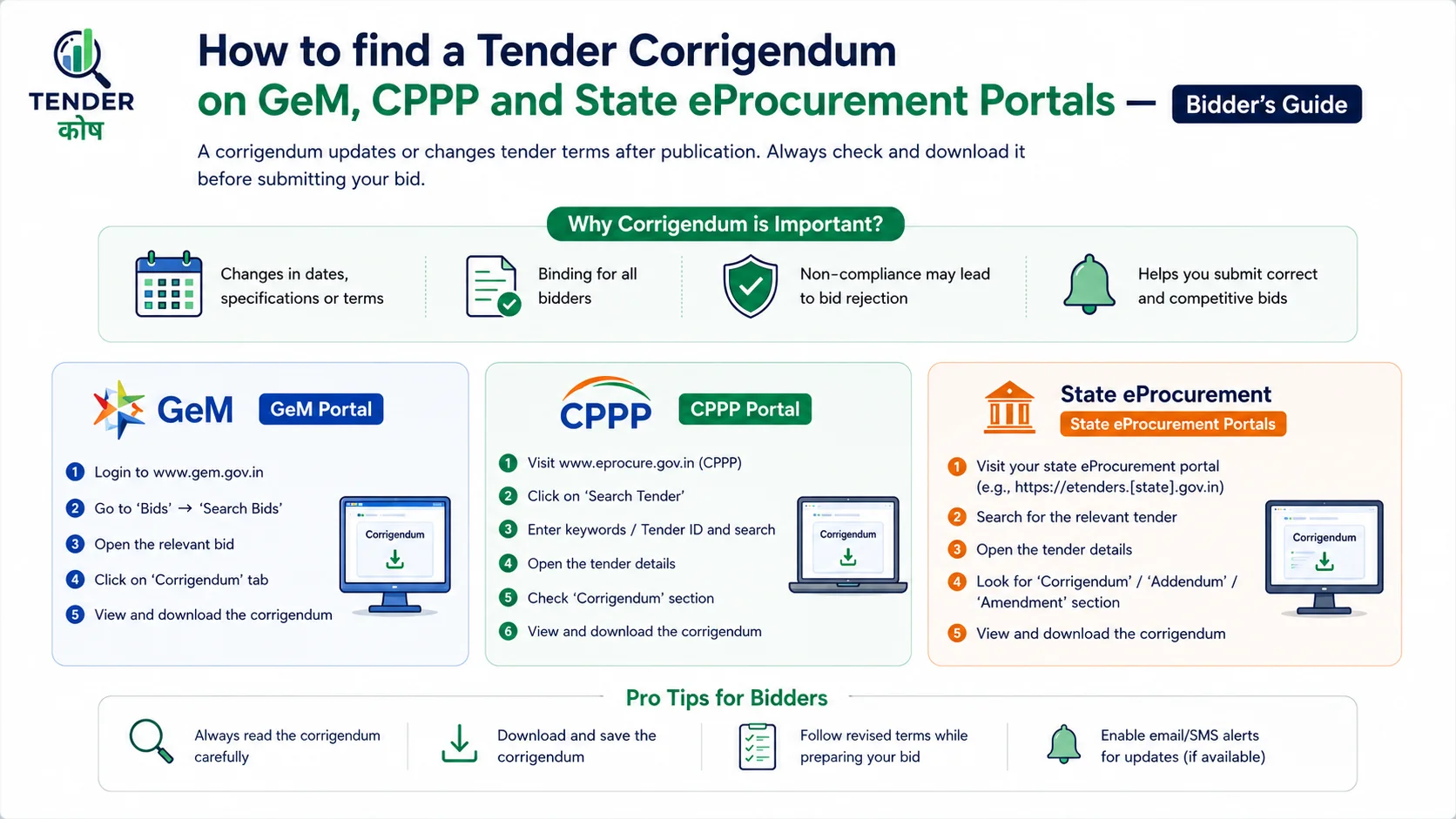
On the Government e-Marketplace, corrigenda (often shown as amendments) live on the individual bid or reverse-auction listing — not in one master list. Here is the reliable way to find them.
Go to gem.gov.in and navigate to the bids / “Bid Listings” area. You can browse open bids or, if you are a registered seller, view bids you have participated in or marked interest in.
Locate the specific bid using its bid number (the unique GeM bid ID). Searching by the exact number is faster and more reliable than browsing categories.
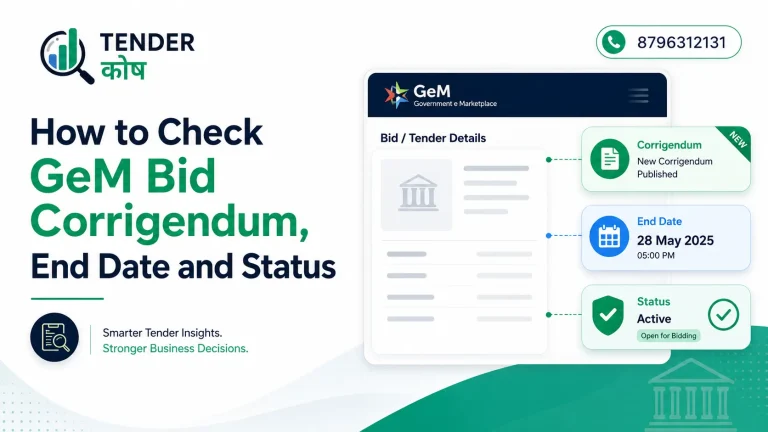
Open the bid’s details page. Any corrigendum or amendment is shown here alongside the original, with its issue date and the revised end date or terms. Always read the latest amendment.
[Insert screenshot: GeM bid details page with the corrigendum/amendment section highlighted.] A clear screenshot here — showing where the amendment date and revised end date appear on a real GeM bid page — makes this section far more useful and screenshot-friendly for readers.
GeM tip: Logged-in sellers are usually notified of amendments on bids they have engaged with, but notifications can be missed in a busy inbox. Re-open the bid page directly close to the submission deadline to confirm the current end date and terms before you submit.
The Central Public Procurement Portal at eprocure.gov.in is the most corrigendum-friendly of the three, because it has a dedicated section for amendments that you can browse or search directly.
On the eprocure.gov.in homepage, use the “Latest Corrigendum” or “Corrigendum” link. This lists recently published amendments across organisations, newest first.
To find a corrigendum for a specific tender, search by tender ID, keyword, organisation, or date. The tender ID is the most precise way to land on the exact amendment.
Each corrigendum entry links back to the parent tender and shows what changed — a revised closing date, an amended document, or updated terms. Download the latest version.
[Insert screenshot: CPPP homepage with the “Latest Corrigendum” link and corrigendum search highlighted.] Show the corrigendum list and the search fields (tender ID, organisation, date) so readers can replicate the exact path.
Most state eProcurement portals run on the same NIC eProcurement platform, so once you learn the pattern, you can find a corrigendum on almost any of them. The URLs differ by state, but the layout is broadly consistent.
On the state portal homepage, look for a “Corrigendum” or “Latest Corrigendum” link, usually on the left menu, the homepage panels, or under the tenders menu.
Use the search to filter by tender ID, department/organisation, or keyword. Many portals also let you filter corrigenda by date published.
Click through to the parent tender to see the full amendment in context, then download the corrected documents and note the revised deadline.
| Portal | Where Corrigenda Live | Best Search Method |
|---|---|---|
| GeM (gem.gov.in) | On the individual bid’s details page | Search by exact bid number |
| CPPP (eprocure.gov.in) | Dedicated “Latest Corrigendum” section | Search by tender ID, organisation, or date |
| State NIC Portals | “Corrigendum” link under tenders menu / homepage | Search by tender ID or department |
[Insert screenshot: a representative state eProcurement portal with the Corrigendum link highlighted.] One example (such as a major state portal) is enough to show the common NIC layout readers will recognise across states.
Finding the corrigendum is only half the job — you have to act on the right change. Run through this quick check every time.
Confirm the current bid submission and opening dates. A date-extension corrigendum is the most common type — and the easiest to act on incorrectly.
See whether qualification criteria, EMD amount, or format have changed. A revised EMD that you don’t match can sink an otherwise winning bid.
If an annexure, BOQ, or specification was replaced, build your bid on the new version. Never submit against a superseded document.
The most expensive mistake is assuming nothing changed. Many bidders download the tender once and never re-check. A single missed corrigendum — a shifted deadline, a revised EMD, or an amended specification — can make a fully prepared bid non-responsive. This is the same compliance trap that causes so many disqualifications; see our breakdown of tender rejection over EMD and documentation errors.
The honest challenge is scale. A contractor active across GeM, CPPP, and several state portals would have to log into each one, every day, and re-check every live tender for amendments — which is simply not realistic during a busy bidding cycle.
Re-open every tender you intend to bid on at least once close to the deadline, specifically to check for a new corrigendum. Make it a fixed step in your bid process.
Where a portal offers alerts or email notifications for bids you’ve engaged with, enable them — but treat them as a backup, not your only line of defence.
Use a tender-tracking platform that pulls tenders and their corrigenda from many portals into one dashboard with alerts, so amendments reach you automatically.
Manually checking GeM, CPPP, and every state portal for a tender corrigendum is impossible to do reliably. TenderKosh tracks tenders and their amendments across 1,000+ government procurement portals and alerts you the moment a corrigendum changes a deadline, eligibility, or specification — so you always bid against the latest version and never lose work to a missed update.
Browse Live Tenders View Plans Why TenderKoshA tender corrigendum is not a minor administrative note — it is a binding change that can decide whether your bid is accepted or thrown out. On GeM you find it on the bid’s details page, on CPPP in the dedicated corrigendum section, and on state portals under the corrigendum link in a familiar NIC layout. Learn those three paths and you can locate any amendment in minutes.
But finding corrigenda one portal at a time does not scale. The bidders who consistently win are the ones who never get caught out by a last-minute change — and the most reliable way to achieve that is to let a tracking system watch every portal for you, so no corrigendum, on any tender you care about, ever slips past.
A tender corrigendum is an official amendment issued by the procuring authority to change something in an already-published tender. It can extend the bid submission deadline, revise eligibility or qualification criteria, change technical specifications or quantities, correct errors, modify the EMD or tender fee, or even cancel the tender. A corrigendum has the same legal force as the original tender document, so bidders must always submit against the latest corrigendum rather than the original Notice Inviting Tender.
On the Government e-Marketplace (GeM), corrigenda for a bid or RA are published on the bid’s own listing. Open the bids section, locate the specific bid using its bid number, and check the bid details page, where any corrigendum or amendment is shown alongside the original document with its issue date. Logged-in sellers who have participated or shown interest in a bid are typically notified of corrigenda, but it is good practice to re-check the bid page directly before submission because amendments can change the end date or terms.
On the Central Public Procurement Portal (eprocure.gov.in), there is a dedicated section for corrigenda. From the homepage you can use the “Latest Corrigendum” or “Corrigendum” link to see recently published amendments, or search by tender ID, keyword, organisation, or date to find a corrigendum tied to a specific tender. Each corrigendum entry links back to the parent tender and shows what has changed, such as a revised closing date or amended document.
Most state eProcurement portals run on the NIC eProcurement system and follow a similar layout. Look for a “Corrigendum” or “Latest Corrigendum” link on the homepage or under the tenders menu, then search by tender ID, department, or keyword. Each state portal (for example those for Maharashtra, UP, Rajasthan, and others) has its own URL but a broadly similar structure, so once you know the pattern you can locate corrigenda quickly across states.
Checking for a tender corrigendum before bidding is critical because a corrigendum can change the very conditions your bid depends on — the closing date, eligibility criteria, EMD amount or format, technical specifications, or required documents. If you submit against the original tender and miss an amendment, your bid can be rejected as non-responsive even if it would otherwise have won. Many bids are lost not on price or capability but because the bidder missed a last-minute corrigendum.
To avoid missing corrigenda across GeM, CPPP, and many state portals, set up a disciplined re-check routine before every submission, subscribe to portal notifications where available, and re-open each tender’s page close to the deadline. Because manually monitoring dozens of portals daily is impractical, many bidders use a tender-tracking platform that consolidates tenders and their corrigenda from multiple portals into one dashboard with alerts, so no amendment is missed.

Discover relevant tenders, monitor corrigenda, compare opportunities, and move from document reading to structured action.